Showing posts with label Asus. Show all posts
Showing posts with label Asus. Show all posts
Thursday, 25 October 2007
Trouble with Asus R2H GPS?
If you're having trouble with the Asus's GPS system, this link might help out. When I get a spare moment i'll be trying this out.

Thursday, 18 October 2007
Bison Camera for Asus R2H and Vista
Success!
I think where I was going wrong first of all that I didn't notice that there was two drivers available. The camera driver that matches my camera (V6.32.00.004 - 800k in size) still caused my PC to freeze when using the camera and also refuse to shut down. This driver is the one that contains the Lifecam utility that you had problems with Warner.
The second driver called "BisonCamInstall" weighing in at just over 4mb allowed the camera to work correctly and my Asus is still behaving itself.
In short, don't install the 1st driver - it doesn't seem to add anything useful and just causes more problems than it's worth.
R2H Vista drivers
I think where I was going wrong first of all that I didn't notice that there was two drivers available. The camera driver that matches my camera (V6.32.00.004 - 800k in size) still caused my PC to freeze when using the camera and also refuse to shut down. This driver is the one that contains the Lifecam utility that you had problems with Warner.
The second driver called "BisonCamInstall" weighing in at just over 4mb allowed the camera to work correctly and my Asus is still behaving itself.
In short, don't install the 1st driver - it doesn't seem to add anything useful and just causes more problems than it's worth.
R2H Vista drivers
Monday, 15 October 2007
Asus R2H and Microsoft ReadyBoost
My Dabs order of a 1GB stick of DDR2 667MHz SODIMM memory is still on it's way to me in the post so been as I got quite bored, and someone was popping down to the local CostCo, I thought it was a good idea to put in an order for some Flash memory! The Asus R2H has an inbuilt SD card reader; and any way of getting these boot times down would be worth a punt...
James returned to the office clutching a SanDisk Ultra II 2.0GB SD card, and a box of 48 Toffee Crisp chocolate bars (Don't ask!) - and I thought wahey! This device looks like it's the 'High Performance' version of Sandisk's SD cards! A stroke of luck indeed, considering it was the only SD card CostCo had in stock...
Non-ReadyBoost Attempt 1: 1 minute 51 seconds
Non-ReadyBoost Attempt 2: 1 minute 48 seconds
ReadyBoost Attempt 1: 1 minute 52 seconds
ReadyBoost Attempt 2: 1 minute 57 seconds
Oh dear! My system has actually slowed down! Not quite the result I expected and suffice to say i'll be using the SD card for storage only in the future.
The Asus is not the kind of system that I would tend to heavily load (Such as using Photoshop with 22 photo's open at a time) or more than 4 Word documents open; so I chose not to run any kind of OS performance tests at this time. However in terms of perceivable difference in everyday operation/loading/closing of programs? None. Or negligable at best (Placebo effect?).
A shame really! I'll just have to hold out for that extra RAM now...
James returned to the office clutching a SanDisk Ultra II 2.0GB SD card, and a box of 48 Toffee Crisp chocolate bars (Don't ask!) - and I thought wahey! This device looks like it's the 'High Performance' version of Sandisk's SD cards! A stroke of luck indeed, considering it was the only SD card CostCo had in stock...
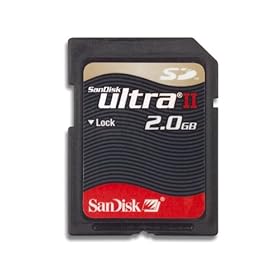
So with SD card in hand I thought I might give Microsoft ReadyBoost a go. For those who are unfamiliar with the term, it's a relatively cheap way of speeding up your system by using SD cards or USB memory sticks to "add" to the system memory available in Windows Vista. Obviously it's not going to be faster than adding standard DDR2 memory but at 9MB/s write and 10MB/s read speeds (60x and 66x speeds respectively) I thought I might see some difference.
Some websites such as Anandtech have seen small differences in performance on their systems but here are my results when I timed Windows booting up. My specs are as follows:
- Asus R2H UMPC
- 900MHz Celeron Processor
- 768MB RAM
- 60GB Hard Drive
- Windows Vista Business Edition
Non-ReadyBoost Attempt 1: 1 minute 51 seconds
Non-ReadyBoost Attempt 2: 1 minute 48 seconds
ReadyBoost Attempt 1: 1 minute 52 seconds
ReadyBoost Attempt 2: 1 minute 57 seconds
Oh dear! My system has actually slowed down! Not quite the result I expected and suffice to say i'll be using the SD card for storage only in the future.
The Asus is not the kind of system that I would tend to heavily load (Such as using Photoshop with 22 photo's open at a time) or more than 4 Word documents open; so I chose not to run any kind of OS performance tests at this time. However in terms of perceivable difference in everyday operation/loading/closing of programs? None. Or negligable at best (Placebo effect?).
A shame really! I'll just have to hold out for that extra RAM now...
Tuesday, 9 October 2007
Camera woes...
Sadly the Asus R2H camera that Warner Crocker of www.gottabemobile.com didn’t seem to like, is also giving me jip.
If I install the drivers my MSN messenger refuses to load, and the PC refuses to shut down.
All else is well, apart from the GPS - maybe i should RTFM.
Monday, 8 October 2007
Lumping Vista onto the R2H
I took the plunge today and considering it’s now 11pm-ish, i’m still installing stuff on Vista - God damn it’s slow!
The experience in Vista doesn’t seem too bad though, with nice clean graphics (Aero doesn’t work - not that it’d be a good idea on this spec anyway…), and suprisingly speedy performance. I managed to successfully grab all of the patches from http://uk.asus.com and after a few hours it was all good. Still have more to go though!
One amusing problem that keeps occurring is that the touch screen stops working - no doubt driver related.
Overall though things seem to be working better - the Bluetooth was picked up straight away; the wireless seems more reliable, and all the buttons work.
It still says “configuring updates” as we speak though. Lame.
The experience in Vista doesn’t seem too bad though, with nice clean graphics (Aero doesn’t work - not that it’d be a good idea on this spec anyway…), and suprisingly speedy performance. I managed to successfully grab all of the patches from http://uk.asus.com and after a few hours it was all good. Still have more to go though!
One amusing problem that keeps occurring is that the touch screen stops working - no doubt driver related.
Overall though things seem to be working better - the Bluetooth was picked up straight away; the wireless seems more reliable, and all the buttons work.
It still says “configuring updates” as we speak though. Lame.
Sunday, 7 October 2007
Proud owner of an Asus R2H!
And yes, in writing this using handwriting!
Initial feeling is the coolness factor but I do have a few immediate gripes - what can I say I’m hard to please! But overall i’m rather stoked. I’ll be using this device in the future as the heart of some of my posts in attempting to use it in my arsenal of enhancing my productivity.
Plus I get to look so chuffing cool in front of customers - yay.
Initial bad stuff though:
Yes it is correct what everyone says, performance is not a strongpoint
With the extended battery on, battery life seems acceptable for my needs, but the device gets quite heavy after a while
I can’t seem to get Blue tooth or GPS working…
One of the buttons doesn’t seem to do owt
OK so a few niggles but largely i ‘m pleased. I got a DVD drive working with on external HD caddy so tomorrow i’ll be putting vista on. I only have 768 mb of RAM so it’ll be a bold move, but id like to try out Ready boost and a few other interesting things!
More to come…
Thursday, 4 October 2007
The Asus R2Hv
 Unfortunately for us Brits this seems an elusive product - and has tempted me to purchase from the States (Risking import duty ). It’s a real shame to be honest as it seems it is the ‘new version’ of the Asus R2H device and has better performance, better battery life, and it’s black…
http://www.asus.com/ doesn’t seem to have any UK retailers listed that sell the device either which is odd - and therefore it does mean that realistically you’ll be paying the full price for the R2H over here knowing full well it’s an inferior product.
Lameness.
Wednesday, 3 October 2007
Picking the right UMPC for you...
So you decide a UMPC is for you - or you just want to try it out as a new gadget! It became apparent to me that there weren’t a great deal of sites out there willing to put all the device reviews together to give advice to consumers such as myself in terms of pro’s and con’s of each device option out there. While i’m the sort of person that looks as much he can at all the facts before making a purchase, I still appreciate a nice summary of what options there are out there from opinions of others who’ve taken the plunge. I’ll tackle the devices that grabbed my attention after I go over my requirements and hopefully you’ll see how I came to the conclusion of a device to purchase! This shouldn’t be used as a guide for yourself though realistically as you’e requirements are likely to be different to mine! I’ll put links to the guides I find useful at the bottom.
Requirements
After using the Tablet PC I realised the following requirements:
Less weight! Holding a tablet PC like a notepad is terrible for arm strain - The C200 a prime example!
Better battery life! Ok this is a tough one for a UMPC as the architecture is shocking for battery life at present. BUT - Why have battery life sucked away driving a power hungry graphics card or CPU that’s powerful but generally gets used for web browsing?
Ink functionality! Nobody can deny the coolness factor of writing on the screen. The problem is that i’d like to do more inking in terms of notes at work, yet moving to a UMPC produces issues because as you’re probably aware - it’s a touch sensitive screen rather than a resistive pen, so leaning on the screen is likely to get ink all over the place - yuck!
Useable performance! While all the above device requirements are really important to me, there’s not much point if it takes 30 seconds to open word or OneNote is there? It’d be nice to watch DivX movies on it too…
Ok so with all the requirements set in place, let’s go over the devices that I have seen satisfactory reviews of:
Samsung Q1 and it’s variants: The Samsung variants did quite alot to confuse me and I found it difficult to find the variant I wanted to purchase on the Internet. The new version is the amusingly named Samsung Q1 Ultra Ultra Mobile PC. While it seems to have better battery life than it’s predecessors due to it’s new A110 processor, some silly bugger decided that an 800MHz CPU was a good idea and therefore this system is unusable for watching films on and will soon reduce most people to tears in the performance stakes. The other (older) variants are the Q1 and Q1P, which were big contenders for my purchasing decisions; and the reasons being that they had acceptable performance, acceptable battery life, good looks and there were plenty about on Ebay to get a decent price! The major problem was though was that the device has a soft screen which might well be a problem for inking alot - not great… Btw there are video’s on YouTube showing this device running FEAR! Let’s stay sceptical about that one for now.
Tabletkiosk eo: One of the first examples of UMPC’s on the market, and it shows! It seems to have ok performance from what many reviewers are saying; yet it suffers from horrendous battery life (I remember 1 hour 39 minutes being a number banded around…) and it looks like it was designed by a blind monkey. None around on the market either except for full price…
Asus R2H: Features a 1.3MP camera, Celeron 900MHz CPU (Oh dear?), and a GPS unit. There seems to be quite a few accessories out there for this device and also it’s fairly popular on Ebay. While the performance of this machine is likely to be pretty slow due to it’s processor, it does have a harder-touch screen, better for inking on. I am not likely to use the GPS function whatsoever, though it is a nice feature…
Amtek T700: Seems like a well rounded device overall, with snappy performance and average battery life. It has good looks too but it does have a soft screen…
Is it worth wating for new UMPC’s to come along? Up and coming devices include:
HTC Shift: Hugo Ortega got suitably excited about this device, and quite rightly so! It’s small, light and has a keyboard tucked tidily away into the small platform! The problems seem to be that it uses that same A110 processor as the new Q1Ultra, and that for me, it’s a little too small.
Amtek T770: Seems to be shaping up to be a well rounded device but doesn’t seem like anything special. The major problem is that I can’t afford £700 (at least) for a new device when at the end of the day it doesn’t get me much more…
So overall considering the features I require and from what i’ve seen in terms of hardware reviews I eventually settled for an Asus R2H for purchase, which is currently on Ebay sporadically or is on www.laptopsdirect.co.uk for a nice price of £599.99. The reason for choosing this device is that it looks really cool, feels light (Though apparently feels slightly heavier than a Q1), has a harder screen, and seems to be acceptable in terms of performance in all the video’s i’ve seen.
If you don’t want to pay alot for a UMPC then the Samsung Q1 is for you, and available on Ebay for around £450ish with a nice keyboard and foldaway case.
The eo is a bit of a dud really, stay well away!
The Amtek is a serious competitor to the Q1 but availability is scarce - I would guess just due to branding and marketing. Keep your eyes peeled for a cheap one out there!
The places I used for reviews were:
www.gottabemobile.com - Awesome site for inkshows, just need a phat pipe for downloading the high res videos
www.google.co.uk - Obviously…
www.engadget.com - Does rather nice reviews of all sorts of devices, and a good excuse for finding ways of spending money.
Subscribe to:
Posts (Atom)

